Getting Started With Commit
Your in-call AI sales coach. Commit listens live and tells you exactly what to say, the right question, the right story, the right answer. Here's how to get started.

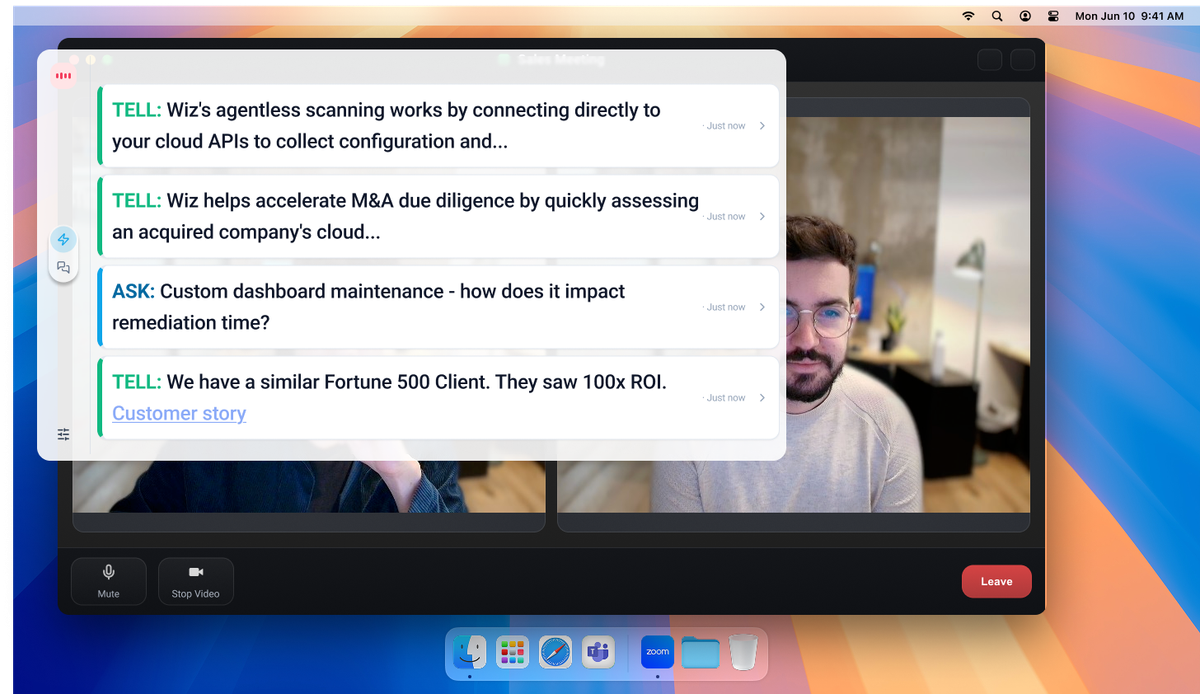
You just joined a call. The prospect is technical. They're asking about agentless scanning, multi-cloud support, and whether you have a customer story in their industry. You know the product works, you just don't know it well enough yet to answer confidently, in real time, without putting them on hold.
That's exactly why we built Commit.
Commit is an AI sales coach that lives inside your calls. It listens to what's being said and surfaces the right tip at the right moment, whether that's a discovery question you should ask next, a competitive positioning point, or the perfect customer story for this prospect's industry. No tab-switching, no Slacking your SE mid-call. Just the answer, right when you need it.
Here's how to get up and running in minutes.

Step 1: Download Commit and connect your calendar
Head to askcommit.com/download and install the app. Once you're in, connect your Google or Outlook calendar. Commit uses this to know when your calls are happening so it can be ready before you even hit "Join."
Step 2: Let Commit learn your product
Commit gets smarter the more you give it. In the setup flow, connect your product docs, competitor battlecards, sales decks, and case studies. If your team uses Notion, Highspot, Google Drive, or Gong, Commit integrates directly and pulls from the same sources you already have.
This is what makes Commit different from a generic AI tool. It doesn't just know about sales, it knows your product, your positioning, and your best customer stories.
Step 3: Run your first call
Open Commit before your next discovery call. As the conversation unfolds, you'll see two types of tips appear in real time:
TELL tips give you something to say, a proof point, a product explanation, or a competitive response. If a prospect mentions a competitor, Commit will surface your positioning against them before you even have time to think about it.
ASK tips suggest the next question to ask. This is where Commit really earns its keep in discovery. Most reps stop one question too early. Commit nudges you to go deeper, helping you get from surface-level pain to the business impact your champion actually needs to make the internal case.
In the screenshots above, you can see this on a real Wiz call. The rep just explained agentless scanning, and Commit immediately surfaced a TELL about how Wiz connects to cloud APIs, plus two ASK prompts pushing to uncover how the prospect handles dashboard maintenance and alert prioritization. That's not generic coaching. That's the exact next move.
Step 4: Review after the call
After each call, Commit gives you a summary of what was covered, which tips were fired, and what topics came up worth following up on. Use this to see where you're consistently getting stuck, and watch yourself get less stuck over time.
What to expect in week one
Most reps tell us the first thing they notice is confidence. Not because you suddenly know everything, but because you're not afraid of the question you can't answer. Commit has your back.
By the end of week one, your discovery conversations will go deeper. More follow-up questions, more uncovered pain, more calls where you stay in control even when the prospect gets technical.